Showing posts with label user profile service. Show all posts

Wednesday, September 14, 2016

oracle.security.idaas.rest.provider.cruds.ResourceNameNotFoundException: Failed to get an user from principal for UID

Receiving "oracle.security.idaas.rest.provider.cruds.ResourceNameNotFoundException"  in OAM logs during the user search operations with IDS Profile services and hence unable to find the user profile from the identity store.

Environment:
  • OAM 11.1.2.3BP07
  • OUD 11.1.2.3
  • RHEL6/OEL6 
Error:

<Aug 29, 2016 10:03:59 PM EDT> <Warning> <oracle.idaas.oauth.resourceserver> <BEA-000000> <Resource is not found :: Resource Name "/ms_oauth/resources/userprofile/me/testuser1" >
<Aug 29, 2016 10:03:59 PM EDT> <Error> <oracle.security.idaas.rest.provider.cruds.ids.IDSUtil> <BEA-000000> <Failed to get an user from principal for UID : testuser1
oracle.security.idaas.rest.provider.cruds.ResourceNameNotFoundException: Failed to get an user from principal for UID : testuser1
    at oracle.security.idaas.rest.provider.cruds.ids.IDSUtil.getUserFromUID(IDSUtil.java:748)
    at oracle.security.idaas.rest.provider.cruds.ids.IDSUtil.getAuthPrincipal(IDSUtil.java:234)
    at oracle.security.idaas.rest.provider.cruds.ids.IDSPersonService.readPerson(IDSPersonService.java:282)
    at oracle.security.idaas.oauth.resourceserver.jaxrs.userprofile.UserProviderFacade.getUser(UserProviderFacade.java:115)
    at oracle.security.idaas.oauth.resourceserver.jaxrs.userprofile.Me.getMyProfile(Me.java:133)
    at sun.reflect.NativeMethodAccessorImpl.invoke0(Native Method)

................
    at weblogic.work.ExecuteThread.execute(ExecuteThread.java:263)
    at weblogic.work.ExecuteThread.run(ExecuteThread.java:221)
Caused By: oracle.igf.ids.EntityNotFoundException: Entity not found for the search filter (&(objectclass=top)(CN=testuser1)).
    at oracle.igf.ids.arisid.ArisIdServiceManager.findEntity(ArisIdServiceManager.java:1709)
    at oracle.igf.ids.UserManager.searchUser(UserManager.java:169)
    at oracle.security.idaas.rest.provider.cruds.ids.IDSUtil.getUserFromUID(IDSUtil.java:744)
    at oracle.security.idaas.rest.provider.cruds.ids.IDSUtil.getAuthPrincipal(IDSUtil.java:234)
    at oracle.security.idaas.rest.provider.cruds.ids.IDSPersonService.readPerson(IDSPersonService.java:282)
    at oracle.security.idaas.oauth.resourceserver.jaxrs.userprofile.UserProviderFacade.getUser(UserProviderFacade.java:115)
    at oracle.security.idaas.oauth.resourceserver.jaxrs.userprofile.Me.getMyProfile(Me.java:133)
........................................

    at weblogic.work.ExecuteThread.execute(ExecuteThread.java:263)
    at weblogic.work.ExecuteThread.run(ExecuteThread.java:221)
Caused By: oracle.igf.ids.arisid.ArisIdNoSuchSubjectException: Entity not found for the search filter (&(objectclass=top)(CN=testuser1)).
    at com.oracle.ovd.arisid.OvdIdsStackProvider.doFind(OvdIdsStackProvider.java:1287)
    at com.oracle.ovd.arisid.ArisIdStackProvider.doFind(ArisIdStackProvider.java:175)
    at org.openliberty.arisid.Interaction.doFind(Interaction.java:1022)
    at oracle.igf.ids.arisid.ArisIdServiceManager.findEntity(ArisIdServiceManager.java:1616)
    at oracle.igf.ids.UserManager.searchUser(UserManager.java:169)
    at oracle.security.idaas.rest.provider.cruds.ids.IDSUtil.getUserFromUID(IDSUtil.java:744)


Cause: 

This might be due to the incorrect search filter configuration in IDS profile that is enabled in OAuth Service provider configuration. It is configured to CN as RDN attribute in my scanrio. Make sure the steps mentioned in the solution and correct the configuration.

Solution:


Make sure the following two services in OAuth default domain are pointed to correct IDS profile(In my case, it is OUDIDSProfile) where your user data is stored.
  • OAuthDomain -> Resources Servers -> UserProfileServices -> Identity Store name -> OUDIDSProfile
 
  • OAuthDomain -> Service Profiles -> User Store -> OUDIDSProfile
  
Also verify the Attribute configurations in IDS Profile settings are configured properly reflecting the correct ldap attributes.
  • Navigate to Configuration -> UserIdentityStores -> IDS Profiles -> OUDIDSProfile -> Entities. Correct your RDN/login attribute settings as shown below.


After making required corrections according to your LDAPStore IDSProfile settings, It should be able to search the user now from your directory store.

Thank you for visiting.

Wednesday, August 10, 2016

OAM: User Profile Services through REST in OAM Mobile and Social

                In today's post, we are going to cover about the user profile services that are provided by OAM Mobile and Social component. From the Latest OAM versions in release2, Mobile and Social component comes with OOB capabilities in exposing the user profile services as REST services. This will help the applications to easily access the user data from Identity stores configured in OAM through REST services without going through additional development for user operations. In addition to these user profile services, Mobile and Social also provides services for Authentications and Authorizations.

Our example today specifically covers about simple configuration of these user profile services with your desired endpoint.

Environment:
  • OAM 11.1.2.3 BP07
  • OUD 11.1.2.3
  • RHEL6/OEL6
Steps:
  •  Login to OAM Console and click on Configuration on top right
  • Go to Available Services and scroll down to see "Mobile and Social"
  • By default this "Mobile and Social" component is disabled as shown below. Click on "Enable Service"
  • Click on "Enable Service" on the confirmation box. This will make the "Mobile and Social" services available for use.
  • Now Click on  "Mobile Security" in the top navigation and Go to "Mobile and Social".
  • Lets create a Service Provider first which is of type User Profile Service provider. Click on "Create User Profile Service Provider"
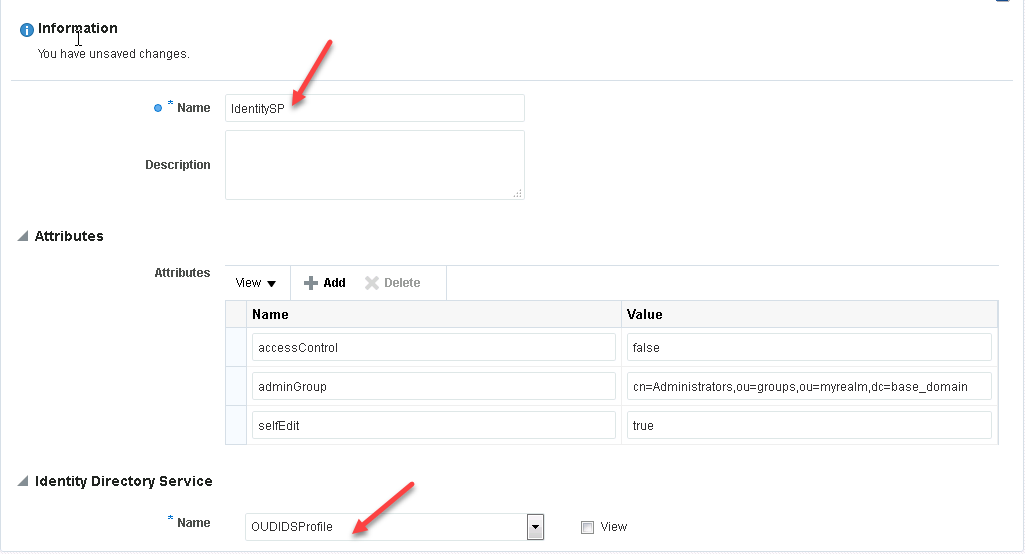
  • Provide the Name of Service Provider and Identity Directory Service as shown below
    • Name : IdentitySP
    • Identity Directory Service Name : OUDIDSProfile
  • Make sure the IDSProfile with the name "OUDIDSProfile" is configured properly with the Users and Groups DN information.
  • Click on Save to create this Service Provider.
  • Next we will create a Service Profile in which we configure the above created Service Provider.
  • Click on "Create User Profile Service" to create the Service profile of type "User Profile" 
  • Provide the values as shown in below screenshot. In this configuration, you can define your desired endpoint name as given below.
  • Also specify the Service Provider that was created in earlier steps and check the "Service Enabled" to enable these services.
  • Click on Create to save this "IdentitySP" service profile configuration.
  • Next step is to add this new Service profile as part of a Service Domain. 
  • Click on "Default" service domain and click on Edit to add the service profile
  • Click on Add and provide this new Service Profile Name in the list. 
  • That's all the configuration. Now your services are ready for access.
Validation:
  • Lets validate this REST service endpoint. Using "Postman" chrome extension, we can validate this REST services.
  • Invoke the REST endpoint by providing
    • Operation : GET
    • URL : http://<OAMHost>:<OAMPort>/oic_rest/rest/IdentitySP/people/<userid>
  • In my example, testuser1 is the user profile that I would like to access. so URL will be
    • http://oamhost:14100/oic_rest/rest/IdentitySP/people/testuser1
 
  •  As shown above, all the configured IDSProfile attributes can be retrieved using this UserProfile services through REST endpoints provided by OAM Mobile and Social.
  • Some more URIs for more operations like
    • Read all users:
      http://oamhost:14100/oic_rest/rest/IdentitySP/people
    • Read all groups: http://oamhost:14100/oic_rest/rest/IdentitySP/groups
    • Read user groups : http://oamhost:14100/oic_rest/rest/IdentitySP/people/testuser1/memberOf
    • Read group memebers : http://oamhost:14100/oic_rest/rest/IdentitySP/groups/test/members  
For more information related to these REST services, you can refer to Oracle docs here. 
 
Thank you for visiting.